Instead of counting towels between appointments, build a salon towel restock schedule that combines appointment demand, clean-stock checks, and recurring calendar reminders. The workflow below keeps your team responsible for shelf refills while a confirmed laundry pickup schedule handles the off-site washing cycle.
- Build your salon towel restock schedule around booked treatments, usable clean towels, and confirmed laundry returns.
- Summalaundry provides recurring commercial towel service for local businesses, including salons and spas.
- Google Calendar reminders prompt staff action; they do not automatically book laundry pickups.
- Keep appointment-driven stock reviews separate from your confirmed recurring pickup schedule.
Why this matters
A full shelf at opening does not prove you have enough towels for the afternoon. Towels already allocated to treatments, waiting for collection, or still being processed cannot cover the next appointment.
Summalaundry is a local laundry service for households needing wash-and-fold pickup and businesses needing recurring towel service. For a salon or spa, the next step is to inquire about towel service with Summalaundry and confirm the collection and return arrangements before building reminders around them.
This 2026 workflow automates the reminder, not the physical restocking. Someone still counts clean towels, moves them to treatment areas, and confirms exceptions with the laundry provider. That distinction prevents a calendar notification from being mistaken for a service booking.
Before you start
- Access and tools: Have permission to view your appointment calendar, edit a shared Google Calendar, and maintain a shared spreadsheet. Use aggregate appointment counts rather than copying client names or treatment notes.
- Service details: Confirm accepted towel types, preparation requirements, pickup arrangements, and the expected return with your provider. For Suwanee, Snellville, Grayson, Loganville, or Buckhead, confirm the arrangements for your exact address.
- The gotcha: Count only usable towels physically back on-site as clean stock. A scheduled return is not available inventory, and a reminder does not confirm a pickup.
Assign 1 responsible employee per shift to the towel check. Give a backup employee access to the same calendar and sheet so an absence does not leave the task unattended.
Build your towel demand sheet
Keep the first configuration unit simple: a shared spreadsheet that connects appointments to towels. This is a planning sheet, not a replacement for your booking system.
- Create the headers. In a blank spreadsheet, enter Date, Towel type, Booked treatments, Towels per treatment, Planned use, Usable clean stock, Reserve, Next confirmed return, and Action owner. These are labels you create, not built-in software settings.
- Separate towel types. Use 1 towel type per row. Hand towels and treatment towels should not share a single stock total when they serve different purposes.
- Measure your actual usage. Have staff record the towels used for each treatment type. Include the complete treatment setup and cleanup rather than relying on an assumed industry average.
- Calculate planned use. Multiply booked treatments by your recorded towel requirement for each treatment type. Add the results for the period you need to cover before the next confirmed return.
- Set the reserve. Choose an operational reserve based on your own walk-ins, extra towel requests, rejected towels, and booking changes. Keep it separate from planned appointment demand.
- Flag the gap. Compare usable clean stock with planned use plus the reserve. Record the shortfall and the employee responsible for resolving it.
Expected result: Your sheet shows which towel type needs attention before appointments consume the remaining stock.
Use this planning rule: required clean stock equals planned use before the next confirmed return, plus your chosen reserve. Do not subtract an expected delivery from today's requirement until the towels arrive and pass your receiving check.
For your 2026 operating sheet, keep the calculation tied to live bookings. A copied schedule becomes misleading when staff add treatments without updating towel demand.
Configure recurring calendar reminders
Use Google Calendar to make the agreed towel routine visible. Create staff tasks around a confirmed laundry schedule; do not use calendar events as proof that a provider has accepted a booking.
- Create the preparation event. In Google Calendar on desktop, select Create, then Event. Name it Towel pickup preparation and select a time when the responsible employee is working.
- Set the repeat pattern. Select Does not repeat, then Custom. Match the recurrence to the collection pattern your provider has confirmed. Select Done after setting the pattern.
- Add the working instructions. In the description, paste the shared spreadsheet link and list the preparation tasks: check accepted items, record outgoing towel types, and follow the agreed collection instructions. Keep client information out of the event.
- Notify the responsible people. Use Add guests for the task owner and backup. Set Add notification to a reminder time that leaves enough room to prepare the collection, then select Save.
- Create a separate receiving event. Repeat the process for checking returned towels. Name it Receive and count towels, and place it around the confirmed return arrangement rather than an assumed turnaround.
Expected result: Staff have recurring preparation and receiving reminders, each with an owner and a link to the same stock record.
The advantage is consistency without rebuilding the task every collection cycle. The limitation is equally important: Google Calendar does not count towels, confirm delivery, or change a commercial service agreement.
Keep your 2026 booking calendar and laundry calendar distinct. Appointment changes affect demand; provider confirmation controls collection and return arrangements.
Set the between-appointment refill routine
The calendar handles recurring tasks. A short shift routine handles towels moving from storage to treatment areas.
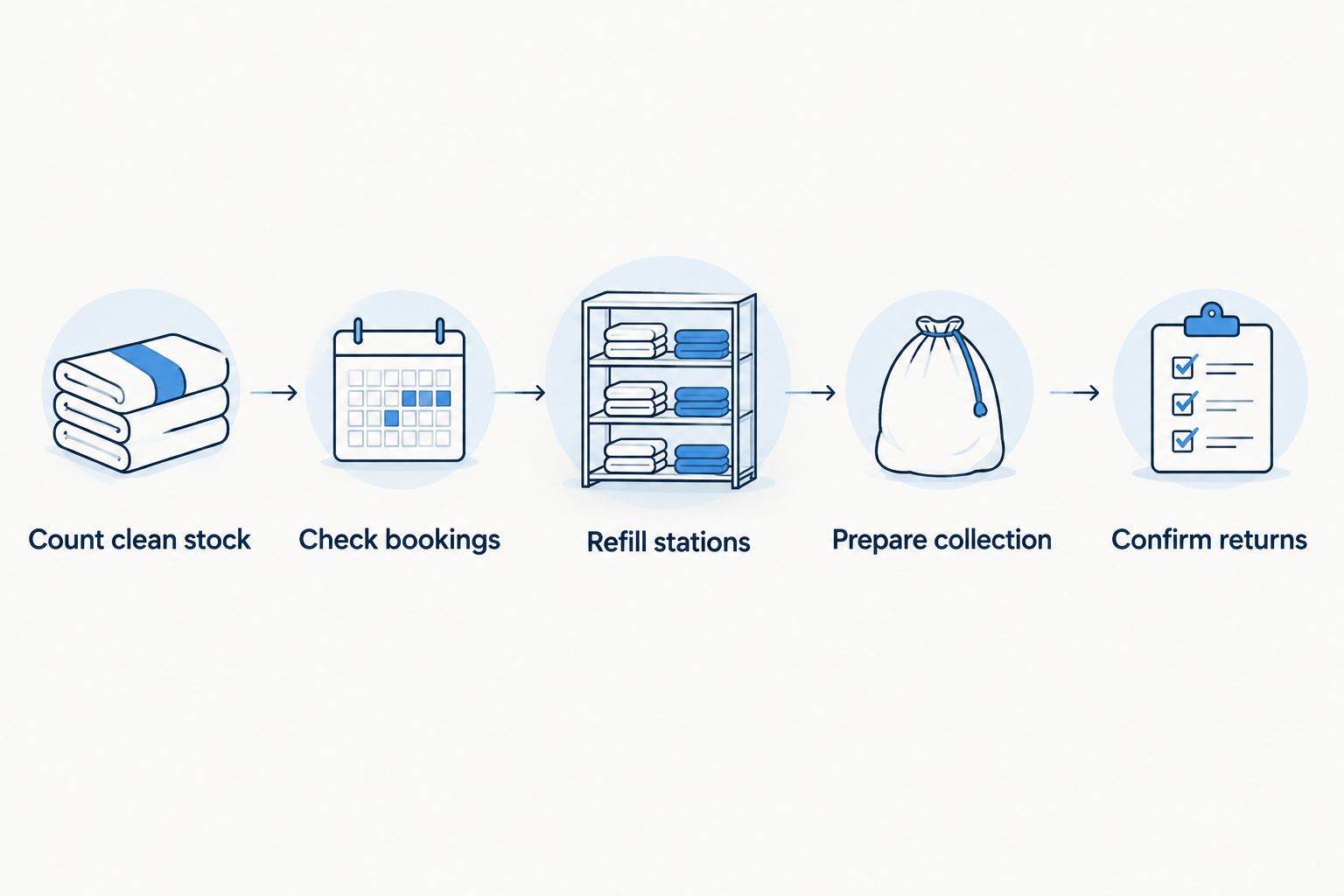
- Count clean stock. Check usable towels by type before the first booked treatment. Exclude damaged towels and anything awaiting review.
- Check bookings. Compare the current appointment list with the planned use recorded in the sheet. Add newly booked treatments before deciding the shelves are covered.
- Refill stations. Move clean towels to treatment areas according to upcoming appointments. Record the movement so storage and treatment-room stock are not counted twice.
- Prepare collection. Keep used towels separate from clean stock and follow the provider's agreed preparation instructions. Confirm handling requirements for towels exposed to treatment products before sending them.
- Confirm returns. Count returned towels by type, check their condition, and update usable clean stock. Record discrepancies before the next shift relies on the total.
Expected result: Staff know what is on-site, what is allocated, and what needs action before the next appointment block.
Start with 2 scheduled checks per working day: opening and before the next major appointment block. This is a starting routine, not a universal requirement; add a check when your own usage shows a gap.
Do not treat a reserve as spare stock for routine overuse. If staff repeatedly consume it, update treatment requirements or discuss the service schedule before the shortage becomes normal.
Review towel demand whenever bookings change
A fixed reminder works for a stable appointment pattern. A booking-driven review covers late additions, group bookings, and changes in treatment mix without pretending that your calendar automatically orders laundry service.
When a booking changes, have the employee handling it update the demand sheet. Review the affected towel types, recalculate coverage through the next confirmed return, and flag any shortfall to the action owner.
Use the following comparison to choose how staff should trigger that review.
| Review method | Best for | Advantage | Limitation |
|---|---|---|---|
| Fixed calendar reminders | Predictable treatment schedules | Gives staff a repeatable preparation and receiving routine | Does not respond to new bookings by itself |
| Booking-change review | Frequent appointment changes | Checks towel demand when the schedule changes | Depends on the booking handler updating the sheet |
| Combined routine | Mixed appointment patterns | Pairs a recurring baseline with exception checks | Needs clear ownership to prevent duplicate tasks |
Use the combined routine when your bookings change throughout the day. Keep the recurring pickup arrangement as the baseline, then contact the provider when your revised demand requires a change. Do not assume an extra collection or earlier return is confirmed.
Studios with scheduled classes can apply the same distinction between predictable demand and exceptions. The guide to connecting gym towel restocking to your class schedule covers that adjacent workflow.
Troubleshooting
The shelf is empty even though the sheet shows stock
Check whether staff counted the same towels in storage and at treatment stations. Give each towel quantity a location in the working notes, and count transfers only once. Remove damaged or rejected towels from usable stock immediately.
Notifications arrive, but nobody prepares the collection
Replace a team-wide assumption with a named action owner. Check that the employee can access the shared calendar, has accepted the event invitation, and has notifications enabled. Put the backup employee in the event instead of relying on a verbal handoff.
Extra appointments consume the reserve
Update demand when the booking is added, not when the client arrives. If the revised requirement exceeds clean stock, escalate it immediately and ask the provider about the available arrangements. A changed spreadsheet does not change the confirmed laundry schedule.
A return is later than the planning sheet expected
Separate the confirmed return information from any internal estimate. Recount usable towels, identify the appointments affected, and contact the provider. Do not leave an old expected return in the sheet as though the towels are already on-site.
Clean towels arrive, but the treatment team cannot use them
Check the towel type, condition, and preparation requirements against what you agreed. Record the issue and keep affected towels outside usable stock. Confirm suitability for product-exposed towels before including them in future collections.
Customize your workflow
Keep the same stock-control method across your business, but separate towel demand by treatment type or work area. A salon shampoo station and a spa treatment room do not automatically have interchangeable towel requirements.
For a new Summalaundry commercial towel service inquiry, bring your towel types, observed usage, working hours, access instructions, and preferred recurring pattern. Those details support a specific discussion without assuming turnaround times or commercial terms.
Households need a simpler version. Keep a laundry collection reminder separate from the business towel calendar, and use household wash-and-fold pickup for the relevant home laundry. A household bag count should not stand in for a salon's towel inventory.
During your 2026 schedule review, remove reminders that no longer match confirmed arrangements. An accurate calendar with clear owners is more useful than a crowded calendar full of ignored alerts.
Set up your laundry routine
Ask about recurring business towel service or arrange household wash-and-fold pickup.
FAQ
What's the best salon towel restock schedule?
The best salon towel restock schedule covers booked treatment demand through the next confirmed laundry return, plus a reserve based on your own usage. Pair recurring preparation reminders with stock reviews whenever appointments change.
Can Google Calendar automatically book my towel pickup?
A Google Calendar event does not automatically book a towel pickup. Use it to remind staff about a collection arrangement already confirmed with your provider.
How many towels should a salon keep in reserve?
Set your towel reserve from your own appointment changes, extra usage, and rejected towels. There is no single quantity that fits every salon, treatment mix, and collection schedule.
Does Summalaundry provide commercial towel service for salons?
Summalaundry provides recurring commercial towel service for local businesses, including salons and spas. Confirm the towel types, preparation instructions, and collection arrangements for your address before scheduling staff reminders.
Can I ask about towel pickup in Suwanee or Buckhead?
You can inquire about business pickup in Suwanee, Snellville, Grayson, Loganville, and Buckhead. Confirm the arrangements for your exact address and business hours before building the collection calendar.
Should staff count towels between every appointment?
Count at defined checkpoints and review demand when bookings change, rather than assuming every appointment needs a full inventory count. Add checks where your actual usage reveals a shortage risk.
How do I update my towel workflow for 2026?
Check that your 2026 reminders match current staff ownership and confirmed pickup arrangements. Update treatment usage, usable stock, and reserve assumptions from your own records rather than carrying forward an unchanged schedule.
One last thing
Count what you can use, not just what you own. Towels sitting in a collection bag, awaiting return, or removed for damage cannot cover the next treatment. Make that distinction visible in your 2026 sheet before adding more reminders.